Saturday, July 18, 2020

Blog#5 Mind Mapping

So what's up today is our week 7 and 5th blog in Educational Technology and its me again your boy Carlo so we will talking about the Mind Mapping that had been given today in our subject educational Technology 2 .
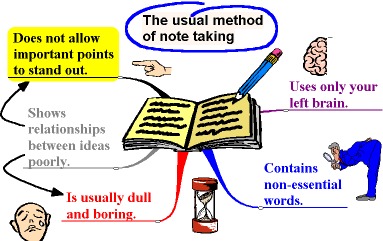
More Effective Note Taking for Study Through Mind Maps - Live ...


So what is Mind Mapping? Mind Mapping is a graphical way to represent ideas and concept. It is a visual thinking tool that helps structuring information, helping you to better analyze, comprehend, synthesize, recall and generate new ideas. So for me base on the picture Mind Mapping is a tool that organize or plan the idea or thoughts that is in our mind. it also show us how our ideas organize, how our ideas related to each other and how our ideas can be expand from specific to general that will help us to easily understand and be a better thinker.

More Effective Note Taking for Study Through Mind Maps - Live ...

So Why Mind Mapping? Mind Mapping increases our creativity and productivity because it is an excellent tool  to let you generate more ideas, identify relationships among the different data and information, and effectively improve your memory and retention. it is also promotes bigger-picture thinking, improved problem-solving, and is a valuable for team collaboration.
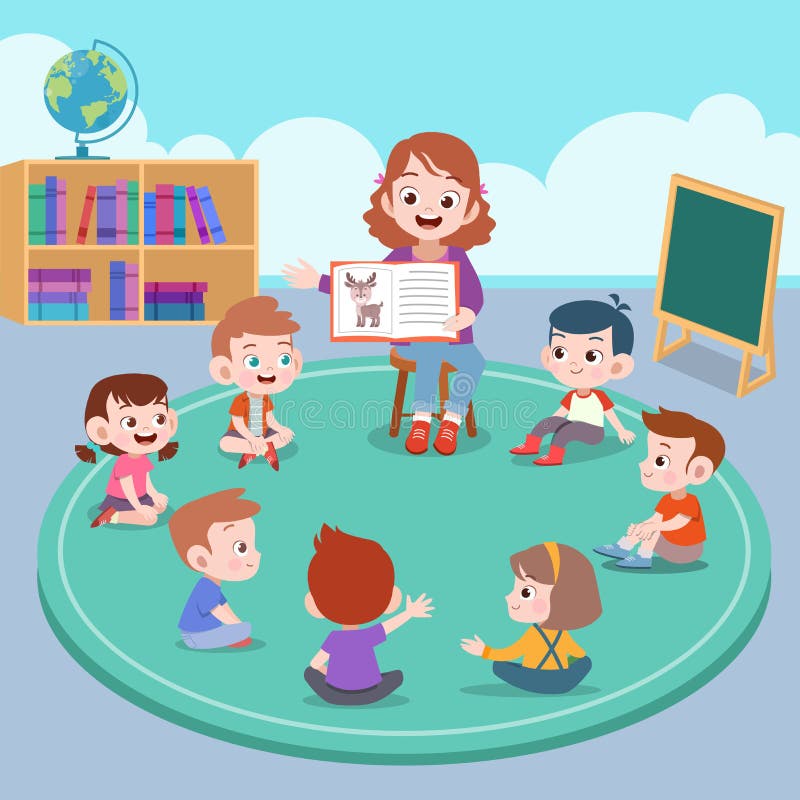
Cartoon Teacher Student Stock Illustrations – 13,293 Cartoon ...

Who Needs Mind Maps?  Mind Maps use by everyone and anyone can benefit from this powerful technique. Whether you’re writing an essay or planning an event, Mind Maps can be used by a variety of people for a variety of purposes. but lets emphasizes this Children, Students and teacher who needs mind maps as help in their teaching and learning process.

Children

Mind mapping can significantly improve children's cognitive development. the composition of mind maps - mostly with colors, shapes, words and images is good for stimulating the development of both kids logical and creative side of the brain. Kids at preschool and school age can all benefit from mind maps. Preschool children can start learning how to connect words, colors, and images and understand the basic matching diverse form. with mind mapping can also be taught the basic concept of studying and doing homework. therefore, kids at school age can be learn how to brain storm, work in teams, prepare school presentation and more.


Students

Whether in high-school or university, students can use mind maps for studying new lessons and preparing for exams. Foe the lessons that are usually more voluminous ans extensive, the composition of mind maps can facilitate the process of learning and memorizing important facts. When it comes to exams, the traditional ways of preparing, lately is getting out of use and students are looking for new ways that make the learning process more effective and efficient. Mind Mapping is an example because it allows them graphically present the most important information of the lessons which later can be easily recalled. By including colors, images and words students can enhance their learning and memorizing skills.

Teacher

Teachers, be that in elementary school, high school or university can use mind mapping as well. While students use it as learning technique, teachers use teaching technique. Every teacher has a unique personal method of lecturing and sharing their knowledge. However, implementing mind maps as a teaching methods is great for both sides in the classroom. On one hand, it helps teacher to deliver their lesson in an effective way by emphasizing all key points. On other hand, it supports the improvement of students memory, learning and communicating skills.
Learning History Cartoon Images, Stock Photos & Vectors | Shutterstock


Mind Map history and uses? Mind maps have a long history, dating back to the third century. Early thinkers and philosophers used graphic designs to diagram various concepts, words and ideas that related to a central thought. Mind maps are a visual method for recording thoughts and related ideas graphically. It works by using one central keyword or idea and surrounding it with a brainstorm style shower of thoughts that somehow relate to that central word. The beauty of the mind map is that it is a very freestyle way to collect and organize information, without being restricted to a particular structure. Use of connecting lines, colors and symbols work together to boost visual perception of the physical map and to increase memory retention of the information. 

But what can we use mind maps for?

- Note taking
- Brainstorming (individually or in groups)
- Problem solving
- Studying and memorization
- Planning
- Researching and consolidating information from multiple sources
- Presenting information
- Gaining insight on complex subjects
- Jogging your creativity

Empowering Students: 6 Proven Strategies | SEU Online

How learning Mind Mapping relevant to Educators in creating lesson plan, Course Syllabus and Curriculum development?

Mind mapping is a good tool in both teaching and learning process.  Making a lesson plan is essential to teaching, but it's usually time consuming. For teachers, mapping a lesson plan can not only save them time but also show a clear picture of the lesson on the whole where you can organize and sequence the process of your teaching, also to allow you to create a creative activity where your students can actively engage to your lesson. Mind Mapping help us also Educator in creating a course syllabus because it allows us to organize or layout each topic in order and by showing how the ideas, topic, subtopic are related to each other that will help the student to easily understand the whole subject and become aware to the expected learning outcome. Mind Mapping also help us educator in developing our Curriculum where they can structure a better plan for the courses, content, learning experience base on what the student need to learn. Mind mapping is a very helpful tool especially in our teaching and learning process technique that show us on how our ideas organize, how our ideas related to each other and how our ideas can be expand from specific to general that will help us to easily understand the idea and be a better thinker.

That's all Thank you for reading!


Photo Credits:
https://www.facebook.com/photo.php?fbid=4837961522896597&set=gm.892086244631380&type=3&theater&ifg=1


References:
https://litemind.com/what-is-mind-mapping/#:~:text=A%20mind%20map%20is%20a,recall%20and%20generate%20new%20ideas.

https://mindmapsunleashed.com/the-mind-mapping-concept#:~:text=Making%20a%20mind%20map%20is,hampered%20like%20linear%20thinking%20does.
 
https://www.imindq.com/blog/13-different-user-profiles-that-use-mind-maps


Tuesday, July 7, 2020

Blog #4 Home Schooling

So what's up today is our week 6 and 4tth blog in Educational Technology and its me again your boy Carlo so we will talking about the Home schooling applying or relating the lesson that had been tackle last saturday in our subject educational Technology 2 .

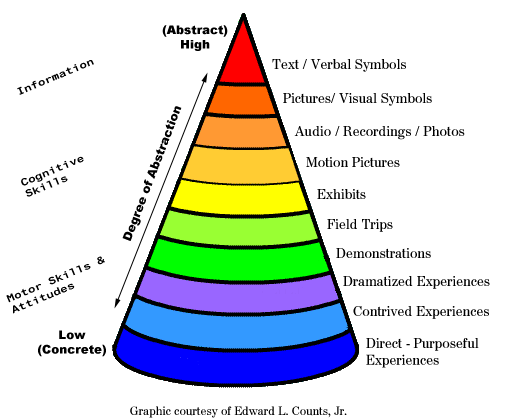
As we face the Covid 19 More parents are now starting to choose home schooling instead of sending their child to schools because they are worry on their child's safety and it is one of the other option in order to continue the learning of the learner even if they are in home. Usually home schooling is conducted by Parent, Tutor and online Teacher. so since we tackle Edgar Dales Cone of Experience we can apply or use some of instructional design that helps our Parent or Online teacher to know what to  do in teaching at home or what to use during online class that will address the needs of our learners. so in online class or home schooling you can use the Television and motion pictures it is a technology equipment that provide a realism that gives understanding to the message that portrayed by actors so in teaching you can show some video in order to experience realism and develop a deeper understanding of a learner . in teaching online class or home schooling you can also use pictures and recording because pictures helps the student to easily absorb a large amount of information quickly by looking at the picture. while in listening in Audio recording  helps the learner to easily understand the voice, the sound and the lesson. you can also use visual symbol, it is shows some signs and symbols that help the learner to understand more the lesson. you can also use verbal symbols which represent some words or phrases that help the student to develop reading skill,and their critical thinking skills. you can also use the other instructional design that make them engage to the lesson at the same time they develop their higher order thinking skills but you have to consider if the instructional design you choose if  its  applicable in online class or home schooling so you can cater what the student needs and develop deeper understanding while enjoying learning at home.

Dale's Cone of Experience - Technology and Beyond


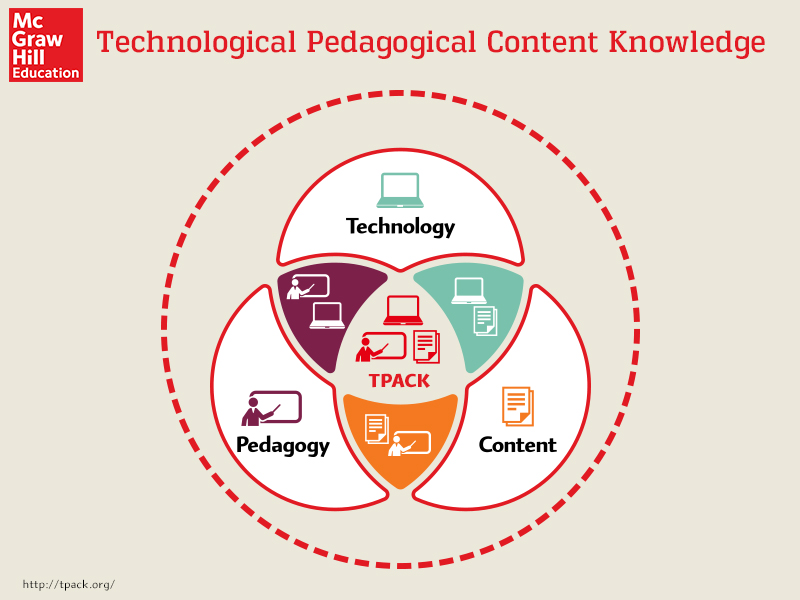
Learning in home will be more effective with the use of Technology Material. So relating to our Topic TPACK which is stand for Technological Pedagogical Content Knowledge that explain the set of knowledge that teachers need to teach their students a subject or lesson, Teach Effectively and use of technology. As we know home schooling is more effective when we use some of technology tool for learning. As a parent or Teacher we must have the knowledge of  using our  Technology tools in teaching because this secure the learning of the learners.you have also have a different method or practice in teaching and in using technology resources in order to cater needs of learner and achieve the learning outcome goals.  also in teaching you should have enough knowledge in  the content it should be mastered so student will deeply understand the lesson.
 
McGraw Hill Canada | What Is TPACK Theory and How Can It Be Used ...

Learning can happened at Home and Home Schooling is not new and it is done a long time ago.
 It is depend on the parents on choosing what is the best for their children to learn. some choose the home schooling because parent believe that they can be a good teacher or a partner in learning experience and believe that they can guide well their child. the only need of parent in teaching is a strong desire to help their children to achieve a better learning and believe that their children can and will succeed. just have have a proper way or methods of teaching, and also the proper use of technology will help you to address the needs  and will secure the learning of your children.
Children At Home With Tutor Or Parent Getting Education, Tiny ...v


That's all for today, Thank you for reading!


Photo Credis:
https://www.google.com/search?q=home+schooling+gif&client=ms-android-huawei-rev1&prmd=inv&sxsrf=ALeKk02d3Rhg0GEpMMFgty1PaR6HpcpkRg:1594162633882&source=lnms&tbm=isch&sa=X&ved=2ahUKEwj-rIbMnrzqAhWIF4gKHUohBggQ_AUoAXoECA4QAQ&biw=360&bih=694&dpr=3#imgrc=NxIUN9CGdDeGlM&imgdii=qhR2C0DZ0FJNlM

https://teachernoella.weebly.com/uploads/1/6/5/3/16531378/7914640_orig.gif


Thursday, June 18, 2020

Blog #3 Taking A Good shot! Phone Photography (My First Recorded Teaching Experience)


So what's up today is our week 3 and 3rd blog in Educational Technology and its me again your boy Carlo so we will talking about  My First Recorded Teaching experience.

When Sir. Cutanda Give us an activity of Recorded Teaching i find it hard because I'm not good at recording my self in front of the camera , Speaking  in front of the camera makes me feel akward, you have to be more presentable and i don't know what topic will present but knowing that this is a way of practicing our profession and developing our skills, so why not give it try, There is always a first time, for everything. 

Recorded Teaching is part of a "New Normal" doing this will help your student to acquire more knowledge and also help us Future Educator to speak well and become more effective in transferring  knowledge also to monitor our self on the things that we need to improve using this recording teaching, doing so needed a lot of Time, effort, creativity and Patience.

So First thing i do is to know what topic will i present and i find it hard also because i cant decide what topic will i present that can consist of minimum of 12 minutes but the good thing is that you can present your hobby as your topic, so first i choose the khalimba tutorial i love playing khalimba but i the problem is i cant create a video content that contains of minimum of 12 minutes.

My first video content.


 so decided to change it to my other hobby which is  Mobile Photography Tips/Tutorial. So i make some research on how to make a video and search about the tips on how to take photos using mobile devices then i make my script.


So I choose this Mobile Photography Content because i like and i enjoy taking pictures while making memories with the people you love, capturing the lovely things in life and also to share my basic knowledge about taking good photos using mobile devices anytime and anywhere.

So in order to get a good and better shots using mobile devices you have to consider this:
1. Clean the Lense
2. Set the Focus
3. Adjust exposure Manually
4.Do not Zoom in
5. Use Gridlines to Balance Shot
6. Stability equals better shots
7. Use the Lead lines
8. Shoot from different perspective
9. Use portrait mode
10. Edit image on the Go!

For more details please click the video link : 


Second thing is the material in making a video  you should have a materials like camera, tripod, microphone and app for editing but the thing is my camera is not working properly so i have to borrow my younger sister phone just to have a good video recording another one is the tripod I don't have this thing so i decided to create an improvise tripod just to have a stable and good video and it is part of being a teacher become more creative , also i dont have a microphone for better voice recording so i just use the built in microphone in the phone. if you can hear the video the voice sound is not clear. The other one is the application, so since its my first time i  ask my younger sister what app is good for editing and she suggested me the kinemaster at first I don't know how to use it but with the help of my younger sister and some search on internet i already learned. Hope than i can purchased those material so i can make more good and quality recorded teaching.

Third thing is the location so i look for a place where the lighting is good but i have some struggles because some of the things in our house are permanently in that area so if you can see in my video i have to edit it just to cover those visible things in the video. the other struggle is I can't manage the noise and i find it hard because every time I record my self  there are unnecessary noise such as the dog is barking, cats fighting at the roof,neighborhood playing loudly music that's why i always have to retake my shots and it is time consuming.


Doing this recorded teaching is also hard and challenging there are  times that i have to sleep late because you have to retake your shot or you have to edit your videos to make it more presentable and eye catching to your student, you have memorizes your script just to have a better and clear presentation but doing this is also a good experience and worth it  because it helps you to become more creative, helps you to become more confident ,helps you to see the things that needed to improve in your teaching skills and lastly helps you to become more ready and effective in teaching at this digital age.

So Finally I'm done with my very first recorded teaching and yes it is challenging but also I enjoy doing it. I know my output is not so good because I'm still in the learning process also I am open for any comment and suggestion  and i will use it as motivation or lesson so next time  i will make a recorded teaching there will be an improvement.


Ending it here! I hope you learn a lot. Thank you for reading, Till next time.

Pls also follow my page at intagram @ carloriesphotography

  Sample shot using Mobile phone

Sunday, June 7, 2020

Blog #2 Online Class :Behind the scene

So what's up today is our week 2 and 2nd blog in Educational Technology and its me again your boy Carlo so we will talking about the Online class behind the scene that presented by Mr. Cutanda last saturday. 
School closure affects Teachers and Students as we face todays greatest challenge and we notice the importance of technology and it help us to make Teaching and learning possible without using the Face to face set up or even when you are at home. As of today as Part of New Normal some schools are conducting  an online class including TUP-T to continue to deliver a better teaching and learning experience by conducting online class there are some guidelines or things to know, effective practices to follow or consider that may also help us future educators on having innovative ways in teaching and be effective online teachers .

So as we started the class Mr. Cutanda  introduced the subject Educational Technology 2 which is focus on the things that we need to consider or the practices that we need to follow on having an online class using zoom app. (As you can see at the picture)  Here we go!


So first thing that we need to consider on conducting online class  is the Preperation. being prepared is the best way to reach your end goal which is to develop effective online learning. So part of the preperation is the fundamental needs this is the tools that we need in conducting online class such as computer, tablet, phone etc. Next is the Equipment setup another part of preperation so in conducting online class we have to ensure the quality of sound,lighting that makes us look presentable,camera positioned effectively etc. Which help us to gain the attention of our students. Next is Understanding the software help us to understand the used or how to operate and execute specific task and to prevent software issues. Last part of preperation is the Teacher Environment appearance of our surroundings or even us educator must be pleasant to look at because it affects enjoyment and students engagement.


Second thing that we need to consider in conducting online class is the Content. Content refers to the information, description of process or procedures and ideas that needed to be discuss. Included here is the Subject delivery and it must be clear, understandable and relevant because how you presented it on students gives an impact to their learning. Next is the Material, Time, Rules and Reminder it help us to be aware in the do's and dont's and proper behavior or manner in online class and to prevent interruption which is time consuming.

Third thing that we need to consider in online class is During Class. Teacher during class must be confident and familiar with content so he will convince and get the students attention adding some gesture helps students to easily understand the lesson but you have to be aware of the gesture that we use adding also some e-games or motivation helps students engagement and interest to the topic but like the normal set up we have to set up some rules in order to have a organize and healthy learning environment.

Lastly that we need to consider in Online class is the After Class. Teacher after class must know if  the student really understand the lesson so by encouraging the student to have an inquiry or ask question or raising some concern about the lesson, topic or the things that they dont understand using or by creating a facebook, messenger group.Lastly send the topic that have been discussed so students can review it.

Understanding and Applying this will help us or guide us future educator on having an innovative ways in teaching and become more ready and effective in delivering learning in the future. Thats all for Today!


Photo Credits :

https://www.google.com/search?q=online+class+GIg&client=ms-android-huawei-rev1&prmd=vin&sxsrf=ALeKk03oERnakDQTiTIP0P9s2IfO1F75fA:1591587705460&source=lnms&tbm=isch&sa=X&ved=2ahUKEwiy8L-epvHpAhWLxosBHZLGBD8Q_AUoAnoECA0QAg&biw=360&bih=694#imgrc=SErSqz7CV73ynM&imgdii=_erF5Be9A8ItcM

Zoom photo credit to sir earl amar

https://www.google.com/search?q=preparation+gif&tbm=isch&ved=2ahUKEwj34s_q4PbpAhVRBaYKHcTxCNMQ2-cCegQIABAC&oq=preparation+gif&gs_lcp=ChJtb2JpbGUtZ3dzLXdpei1pbWcQAzIECCMQJzoHCCMQsAIQJ1DWD1jK2QJgx-ACaABwAHgAgAGkAYgB2weSAQM0LjWYAQCgAQE&sclient=mobile-gws-wiz-img&ei=AZDgXrfeAtGKmAXE46OYDQ&bih=489&biw=360&client=ms-android-huawei-rev1&prmd=ivn&tbs=itp%3Aanimated&hl=en#imgrc=U_McPbqd0HskKM

https://www.google.com/search?q=content+gif&client=ms-android-huawei-rev1&prmd=ivn&sxsrf=ALeKk00Sd5z2mr5hcowSVIurSiLNfxXrHA:1591775395504&source=lnms&tbm=isch&sa=X&ved=2ahUKEwi1jou44fbpAhWCy4sBHZPCB9wQ_AUoAXoECA4QAQ&biw=360&bih=694#imgrc=SChtXRMTxLfz0M

https://www.google.com/search?q=during+my+class+gif&tbm=isch&hl=en&chips=q:in+the+classroom+gif,g_1:animated:6ALQR1O5_uo%3D&bih=694&biw=360&client=ms-android-huawei-rev1&prmd=ivn&hl=en&ved=2ahUKEwjk9pCM4_bpAhU4xIsBHTB0AcoQ4lYoAXoECAEQDA#imgrc=QoII8c-rS3vPoM

https://www.google.com/search?q=after+class+gif&client=ms-android-huawei-rev1&prmd=ivn&sxsrf=ALeKk00jx1Szuq93mQ2I1yuJz-CL9Gth8Q:1591775942116&source=lnms&tbm=isch&sa=X&ved=2ahUKEwiZzd284_bpAhUQc3AKHZjDCnUQ_AUoAXoECAwQAQ&cshid=1591775961769&biw=360&bih=694&dpr=3

Sunday, May 31, 2020

Blog #1 EdTech 2 "New Normal” in Education in the midst of COVID 19 pandemic.

So watsup its me again your boy Carlo its been long time since  the last time i posted my blog and we are now on third semester  a new Topic will be disscuss in educational Technology 2 Subject so let's begin!.


This Covid 19 pandemic is  considered as todays greatest challeged that we face today. it affects not only the peoples life but also affects bussiness, work, Health, social gatherings and even Education which is Temporary force to close all of the school and not allow all the students to go outside in order to secured their safety and to avoid spread of the virus. 


At this crisis we allready noticed the importance of Technology it plays a very crucial role in keeping our society functional  in time of lockdown. Technolgy  help us to make our life more easier, it help us to go online shopping, help us to pay online, help us to reach out with our friends and family, help us to work or make online bussiness and lastly help us to gather more information and offers online learning by not coming out  and taking risk of our lives and we call it "New Normal".


Since we are on the "New Normal" We have to accept the fact that there are some changes or new set up in living this life like in our education in order to deliver the teaching and learning without risking the students and teachers life they are force to use Technology such as Laptop, tablet and cellphone as tool for communication and try some apps like zoom, Google Classroom and even Facebook and Messenger and we know that its not easy to some teachers specially to those who not know how to use it but still trying their best .In this situation it teaches us to become more flexible and adaptable  to have innovative ways  in teaching and learning process no one can stop us even virus to learn more thats why we have to embrace this alternative ways to continue our educational program.

But what about the student who have no means of having a Laptop, cellphone, strong internet connection, Load for data? Studies are important but they will think first their basic needs to survive . This are the problems or challenges of some student that they are facing of having an online class. Educational Technology will be tested in availablity and accessibility of resources but this must have a solution and consider all the situatuation so no student left behind. As future educator we have to help our students by cheering them up and by  giving them more alternative learning methods or resources and as a student we have to believe in our teachers because they are doing their best to find a better solution or way to deliver a better learning for us.

Everything is going to be ok soon. It may not be today, but eventually it will. So hang in there surrender all your worries to the Lord and Trust in him!

Ending it here! Keep safe everyone!


Photo Credits:

https://www.google.com/search?q=new+normal+covid+gif&tbm=isch&ved=2ahUKEwj64_H_6t3pAhUcx4sBHUqVCh8Q2-cCegQIABAC&oq=New+Normal+gif+&gs_lcp=ChJtb2JpbGUtZ3dzLXdpei1pbWcQARgCMgQIABAeMgYIABAFEB4yBggAEAgQHjoECCMQJzoCCABQ3E5Y7V9g1W9oAXAAeACAAekBiAGRBZIBBTAuMy4xmAEAoAEB&sclient=mobile-gws-wiz-img&ei=OH_TXvrnIJyOr7wPyqqq-AE&bih=694&biw=360&client=ms-android-huawei-rev1&prmd=ivsn#imgrc=HqTMvdneGhcQ0M&imgdii=jQaZNq4eY0PYbM

https://www.google.com/search?q=covid+19+gif+vector&tbm=isch&ved=2ahUKEwicv4PE6t3pAhXBI6YKHaU_B4kQ2-cCegQIABAC&oq=covid+19+gif+&gs_lcp=ChJtb2JpbGUtZ3dzLXdpei1pbWcQARgAMgIIADICCAAyAggAMgIIADICCABQmakFWJmpBWC4ygVoAHAAeACAAaoBiAGqAZIBAzAuMZgBAKABAQ&sclient=mobile-gws-wiz-img&ei=un7TXpz6PMHHmAWl_5zICA&bih=694&biw=360&client=ms-android-huawei-rev1&prmd=ivsn#imgrc=JNuzE1-m1QEcbM

https://www.google.com/search?q=work+from+home+gif&tbm=isch&ved=2ahUKEwiEi5Tx6t3pAhVCT5QKHfsQAooQ2-cCegQIABAC&oq=work+from+home+gif&gs_lcp=ChJtb2JpbGUtZ3dzLXdpei1pbWcQAzICCAAyAggAMgIIADICCAAyAggAOgcIIxDqAhAnOgQIIxAnOgQIABBDULPRCVjLjgpgoZAKaAhwAHgAgAG-BIgBtimSAQwwLjE0LjUuMS4wLjOYAQCgAQGwAQU&sclient=mobile-gws-wiz-img&ei=GX_TXsSaJ8Ke0QT7oYjQCA&bih=694&biw=360&client=ms-android-huawei-rev1&prmd=ivsn#imgrc=Fyw3DvVJqHF8

Facebook Friends

Tuesday, March 10, 2020

Week 9 :Sketchup Tool For a better Teaching and Learning process

Last time we use adobe photoshop program for editing pictures. But for this week we will talk about Sketchup. SketchUp is a 3D modeling computer program for a wide range of drawing applications such as architectural, interior design, landscape architecture, civil and Mechanical aengineering film and video game design. 


So watsup its me again your boy Carlo its a new week and new Topic will be disscuss in educational Technology Subject.

Many of us future educator feel that have little or no talent for drawing or designing by hand which can lead to a negative self-image. This perception may use creativity in fields that involve illustration and design. With the use of software such as SketchUp, teacher with poor drawing skill may find a new strength in their ability to create. interacting with the software. Working in virtual environments such as SketchUp allows your students to “focus or easily engage on visualize presentation and much broader than language alone”

 Since some of us are not good in drawing and visualization is a very important part of the process in learning  Sir.Cutanda introduced another Digital Learning Tools that help us to solve this problem so this is the sketch up which help us to create, design or Draw things in a 3D way and shows us how the model will look in real life. He teaches us some basic techniques in creating houses, building and he example his previous work that he created which we realy amazed because its very detailed and look so hard to do. But i beleive that i can also do it i just have to follow the instruction of sir. Cutanda.in order to practice our newly acquired knowledge Sir. Redgie give us an assignment which we will create and design with our own the BASD Building.


For begginer it was so hard that's why you have to listen carefully to sir. Redgie's lecture in order to learn the basic. show you how to build a simple 3D object and how to use basic commands and tools in order to turn your ideas into the third dimension. And it is happy to think that you could able to create your own design and use your creativity.

Sketchup can be used to support students learning and unterstanding to the concept inorder to feel, experience or visualize in real life which help student to focus or engage the student in your lesson easily

Thats all for now 🌞 Thank you!

Photo Credits:
https://www.google.com/search?q=sketch+up+gif&client=ms-android-huawei-rev1&prmd=ivn&sxsrf=ALeKk00ZzhpNf5fne6rsGKX8LXVuDjWg5w:1583895460064&source=lnms&tbm=isch&sa=X&ved=2ahUKEwiUjoiytpHoAhUECqYKHT4kCWMQ_AUoAXoECA4QAQ&biw=360&bih=694&dpr=3#imgrc=cIh9oqsLbfPK0M

https://www.google.com/search?q=digital+learning+gif&client=ms-android-huawei-rev1&tbm=isch&prmd=inv&sxsrf=ALeKk03coj5PleAy0zrS8W_BKEdHN6w13g:1583206237664&source=lnms&sa=X&ved=0ahUKEwjGtZvrrv3nAhXRfd4KHYWpBBQQ_AUIEygB&biw=360&bih=694&dpr=3#imgrc=Xe6vduK0gueTyM

https://www.google.com/search?q=sketch+sketchup&tbm=isch&client=ms-android-huawei-rev1&prmd=ivn&hl=en&ved=2ahUKEwjdkrr1tf3nAhUG25QKHd56BeoQrNwCKAJ6BQgBEJYB&biw=360&bih=694#imgrc=uJnfMeQYi9kJaM&imgdii=CnWBg-PUUs877M

Monday, March 2, 2020

Week7 & 8 : Digital Learning Tools: Photoshop

Many of our learners prefer to see or visualize versus read information in Learning and many learners get their learning “on the go with the help of digital learning tools like Photoshop and sketch up it help us to process digital image and to improve their look and if you are not good in drawing it can help you to create a a good 3d design drawings.in short this tool help us to prepare image use in teaching and learning


So whats up it's me again your boy carlo so today we will talking about the topic that we have discussed in edtech which is the adobe photoshop and sketch up.

So i was excited when i heard that we will be doing a photo editing using photoshop because i love taking photos and for me it is an art that i always appreciate so it is a good oppurtunity to learn or acquire a new skill in editing in order to give image a life and meaningful that might use  especialy in my teaching to easily engage my learner or see the big picture of the topic. So sir cutanda introduced us some techniques in editing and manipulating photos and i listened carefully and i am amazed because he has a lot of experienced to this so he used some of his photos to edit in order to understand the process easily. Since we acquire the basic techniques Sir.Cutanda give us an assignment in order to apply the skill that we acquire in his lesson.

Here is my output looks funny but we have the potential to become a Love team.

This photo shows that love your self first. 😂

This photo was edited by sir.cutanda to teach us the other easiest way in editing .


As a teacher working on a presentation you'll likely need to use images in your teaching and learning materials to help you explain,understand the concepts easily and help you to engage with your learner.

Photo Credits: 
https://www.google.com/search?q=digital+learning+gif&client=ms-android-huawei-rev1&tbm=isch&prmd=inv&sxsrf=ALeKk03coj5PleAy0zrS8W_BKEdHN6w13g:1583206237664&source=lnms&sa=X&ved=0ahUKEwjGtZvrrv3nAhXRfd4KHYWpBBQQ_AUIEygB&biw=360&bih=694&dpr=3#imgrc=Xe6vduK0gueTy